Every step between a student seeing an ad and submitting an inquiry form is a place where they leave.
In a standard digital advertising setup, that journey looks like this: see the ad, click through to the university website, wait for the page to load, find the inquiry form, fill in name, phone, email, programme of interest, maybe city and year of graduation, then submit. On mobile, this is genuinely uncomfortable. The page loads slowly, the form fields are small, and somewhere in the middle of typing their phone number on a thumb keyboard, the student closes the tab.
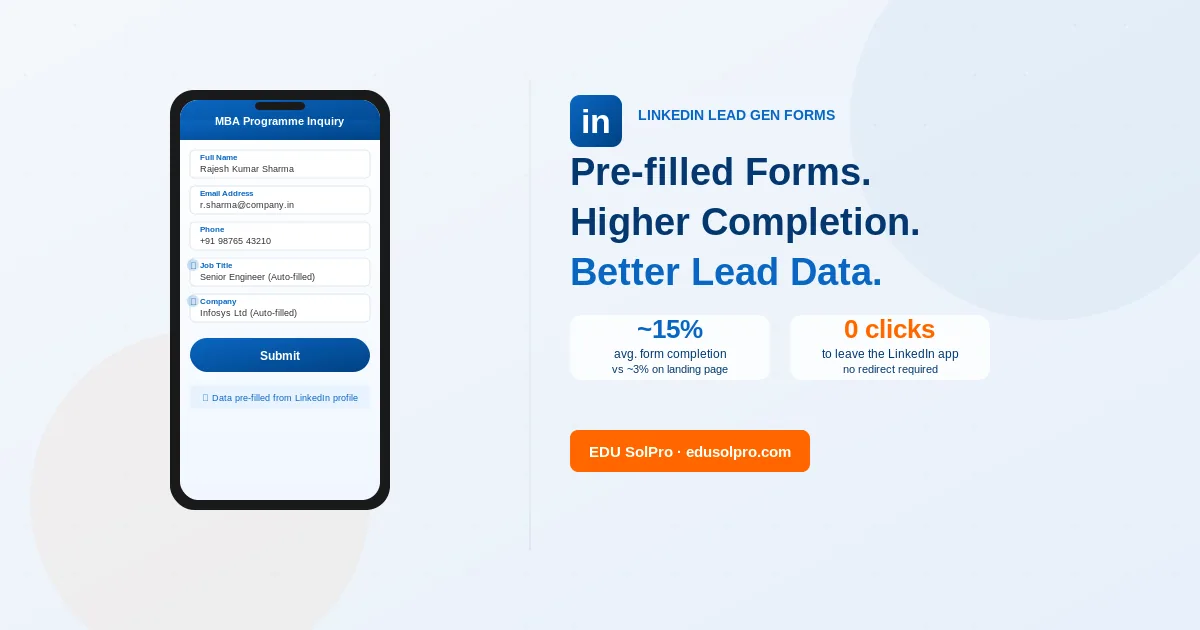
LinkedIn Lead Gen Forms cut most of that out. When a professional clicks on a Lead Gen Form ad, a form opens inside the LinkedIn app, pre-populated with their profile data. Name, email, phone, job title, current company, years of experience — all pulled automatically. The user checks the details and taps submit. The lead goes directly to the university’s CRM or lead inbox.
For PG admissions campaigns targeting working professionals, this changes the conversion numbers.
What gets pre-filled — and why it matters
The fields that LinkedIn can pre-populate from a user’s profile include: full name, email address, phone number, job title, company name, company size, industry, seniority, years of experience, degree field, school, and LinkedIn profile URL.
For a university running a Master’s or MBA admissions campaign, the most useful pre-filled fields are name, email, phone, job title, company, and years of experience. These are exactly the fields that a counsellor needs to qualify and follow up with a lead. Getting them pre-populated, accurately, without asking the user to type anything, removes the two main friction points in mobile form completion: the effort of typing and the reluctance to hand over contact information.
On a standard landing page, a user fills a form knowing they’re handing their details to an organisation they’ve just discovered. On LinkedIn, they’re submitting a form to a university that has advertised on a professional platform they use regularly — the psychological threshold for sharing contact information is lower because the context feels professional rather than transactional.
The accuracy of pre-filled data also matters operationally. Phone numbers entered manually on a form are often incorrect — a digit transposed, a digit dropped. Phone numbers pulled from a LinkedIn profile that the user actively maintains for professional reasons are reliably current. Counsellor teams following up on LinkedIn leads spend less time on disconnected calls and more time on conversations with people who actually intended to share their contact details.
Form completion rates: what to expect
Form completion rates on LinkedIn Lead Gen Forms are consistently higher than on standard landing page forms for the same audience.
The reasons are specific, not mysterious. First, the form appears within the app the user is already using — no page load, no redirect, no navigation. Second, most fields are pre-filled, reducing the manual effort to a review-and-submit action. Third, the professional context of LinkedIn makes submitting professional details feel appropriate in a way it might not on a general website.
For university admissions campaigns, the realistic comparison is a 3 to 5% form completion rate on a well-optimised landing page versus a 12 to 18% completion rate on a LinkedIn Lead Gen Form campaign targeting the same audience. The range varies by programme, audience quality, creative, and form design, but the direction is consistent.
What this means practically: a campaign that generates 1,000 ad clicks sends 30 to 50 leads through a landing page form and 120 to 180 leads through a Lead Gen Form. At the same ad spend, Lead Gen Forms produce more leads — not because the audience is different, but because the conversion mechanics are easier.
How to set up a LinkedIn Lead Gen Form
Lead Gen Forms are created and managed inside LinkedIn Campaign Manager. They are attached to Sponsored Content or Message Ad campaigns, not standalone.
A few things are worth knowing before you start building.
First, the campaign objective. Lead Gen Forms are only available when the campaign objective is set to Lead Generation. If the objective is Website Visits or Brand Awareness, the Lead Gen Form option won’t appear in the ad creation flow at all.
Once you’re under the Lead Generation objective, the form builder lets you set a headline (up to 60 characters), offer details (up to 160 characters), a privacy policy URL, and the confirmation message the user sees after submitting. The privacy policy URL is mandatory — LinkedIn requires it. It needs to point to an actual page on the university’s website, not a template or third-party document. If one doesn’t exist, it needs to be created before the form goes live.
Field selection is where most first-time setups go wrong. LinkedIn gives you a mix of auto-filled fields (pulled from the user’s profile) and custom questions (which the user fills manually). The recommended setup for PG admissions is simple: Name, Email, and Phone Number as auto-filled fields, plus Programme of Interest as a single custom dropdown question. That’s it. Every additional manual-entry field you add increases drop-off. The whole point of Lead Gen Forms is that submitting feels easy.
After submission, users see a confirmation screen with the message you wrote and an optional CTA button. Setting that CTA to the relevant programme page — “Explore the MBA curriculum” or similar — gives users who want more information somewhere to go immediately rather than returning to a LinkedIn feed.
CRM integration: getting leads to counsellors immediately
The leads from LinkedIn Lead Gen Forms sit in Campaign Manager until they’re either downloaded manually or integrated with a CRM. Manual download works but is not recommended for admissions campaigns, because speed of follow-up directly affects conversion. A lead followed up within an hour has a dramatically higher chance of converting than one contacted 48 hours later.
LinkedIn integrates natively with Salesforce, HubSpot, Marketo, Eloqua, and Microsoft Dynamics. For universities using one of these CRMs, the connection is established through Campaign Manager under Account Assets > Lead Gen Forms > CRM Integration. Once connected, leads flow into the CRM in near-real-time.
For universities using Indian-built CRM tools or custom lead management systems, the practical integration option is Zapier. LinkedIn has a Zapier integration that can route new Lead Gen Form submissions to almost any downstream system — Google Sheets, custom CRM, WhatsApp Business via API, or email — within minutes of submission. Setting this up requires a Zapier account and a one-time configuration, but once running it’s reliable and requires no manual intervention.
For universities without CRM integration of any kind, LinkedIn Campaign Manager allows setting up email notifications when new leads are submitted, which gets leads to the counsellor team faster than manual downloads even if it’s not as clean as a full CRM integration.
Designing the form offer: what makes someone actually submit
The pre-filled form removes friction. The offer is what makes a professional actually tap submit.
For PG admissions campaigns, the most effective Lead Gen Form offers are specific and low-commitment:
“Download the MBA programme brochure” works well because it’s clear what the user is getting, it’s a low-stakes exchange, and it implies they’ll receive something immediately useful. A brochure that is actually useful — with fee structure, programme curriculum, placement data, and eligibility criteria — makes the lead feel like a fair exchange rather than a data capture exercise.
“Get your eligibility confirmed in 24 hours” works because it addresses a specific concern (am I even eligible?) and promises a fast, specific response rather than a general follow-up call.
“Speak to a student from the current batch” works for applicants who are further along in their research and want peer information rather than institutional information.
What doesn’t work: generic offers like “Learn more about the programme” or “Express your interest.” These give the user no clear picture of what they’ll receive after submitting, and that ambiguity reduces completion.
The offer needs to be specific enough that the user can answer “what do I get by filling this form?” before they tap submit.
Lead Gen Forms vs landing pages: when to use which
Lead Gen Forms are not always the better choice. There are cases where directing traffic to a landing page makes more sense.
Lead Gen Forms are better when: the primary goal is lead volume, the audience is mobile-first, the counsellor team can follow up quickly, and the programme is well-known enough that the prospect doesn’t need to read extensive content before deciding to inquire.
Landing pages are better when: the programme is complex or expensive enough that prospects need significant content before they’re ready to inquire, the university wants to establish brand credibility through the website experience before collecting a lead, or the campaign objective includes website remarketing via the LinkedIn Insight Tag.
In practice, many university LinkedIn campaigns run both in parallel. Lead Gen Forms for top-of-funnel campaigns targeting cold audiences where volume and ease matter. Landing pages for warm audiences (retargeting people who’ve already engaged with a previous ad) where the prospect is further along and the content depth of the website is an asset rather than friction.
What a good follow-up process looks like
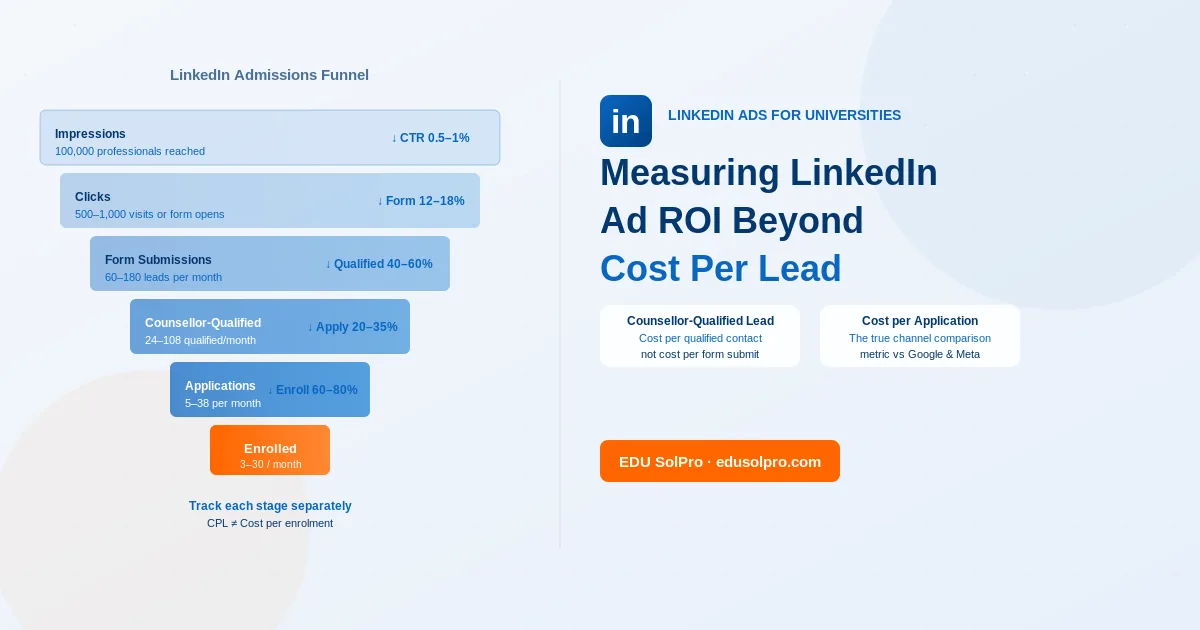
A Lead Gen Form completion is the beginning of the admissions conversation, not the end. The conversion rate from lead to application depends almost entirely on what happens after the form is submitted.
The first contact should happen within 60 minutes of form submission, while the lead is still thinking about the programme. A phone call from a counsellor who knows the prospect’s job title and company (from the pre-filled form data) can open a more relevant conversation than a generic follow-up script.
The follow-up sequence for LinkedIn leads should differ from landing page leads in one respect: the lead has already identified themselves as a working professional in a specific industry. The counsellor follow-up, the email nurture sequence, and any retargeting should all acknowledge that context. Sending a generic “Thank you for your interest in our MBA” email that could apply to any applicant type wastes the professional specificity that LinkedIn delivered.
To see Lead Gen Forms used in practice alongside website conversion campaigns, read the CEPT University LinkedIn Ads case study — a two-phase campaign that tested both approaches simultaneously.
The broader context for how Lead Gen Forms connect to campaign architecture is in our post on why LinkedIn Ads work better than Google Ads for Master’s programme admissions. For audience construction that makes the forms actually reach the right people, our guide on targeting the right audience for PG admissions on LinkedIn covers that in detail.
Our LinkedIn Ads service for universities includes form setup, CRM integration, and the follow-up process architecture for universities setting this up from scratch.
Frequently Asked Questions
Can LinkedIn Lead Gen Forms be used for UG admissions campaigns? Technically yes, but practically the fit is poor. The LinkedIn user base skews towards working professionals, and the pre-fill data (job title, company, years of experience) is not relevant for a 17-year-old considering a BBA. For UG admissions, Meta Lead Ads, which work on a similar pre-fill principle but on a platform where the target demographic actually spends time, are a better option.
What happens to the data submitted through a Lead Gen Form? The data is stored in LinkedIn Campaign Manager under the Lead Gen Forms dashboard. It can be downloaded as CSV, connected to a CRM via native integration, or routed to other systems via Zapier. LinkedIn retains lead data for 90 days; after that, it is no longer accessible from Campaign Manager, so regular download or CRM integration is important.
Do users see that their data is being used to pre-fill the form? Yes. When the form opens, LinkedIn shows the user which fields will be pre-filled from their profile, and users can edit any pre-filled field before submitting. This transparency is part of why the data tends to be accurate — users have seen what’s being shared and confirmed it.
How many custom questions should a university Lead Gen Form include? One, maybe two. Each custom question that requires manual input from the user reduces form completion. For PG admissions, the minimum useful custom field is Programme of Interest — a dropdown that lets the counsellor team know which specific programme to follow up on. Adding a second field (city of residence, for example) is sometimes useful for routing leads regionally. Beyond two custom questions, completion rates drop noticeably.
Can the same Lead Gen Form be used across multiple campaigns? Yes. A Lead Gen Form is created once and can be attached to multiple ad campaigns. For universities running different campaigns for different programmes, the cleanest approach is one form per programme — so that Programme of Interest is pre-determined rather than requiring a custom question. Each programme’s form is attached to its respective campaign, and leads self-sort by programme before they reach the counsellor team.