If your school isn’t ranking well on search, it’s not because you haven’t tried. It’s because something fundamental is broken.
Many educational institutions invest in SEO but don’t see results because they’re making mistakes that prevent them from ranking where it matters.
Whether you’re working with a college SEO specialist, an SEO agency for schools, or handling it in-house, fixing these issues can directly impact student inquiries and enrollments.
This blog breaks down the most common SEO mistakes made by universities, colleges, and schools. You’ll understand what’s going wrong, why it matters, and how to fix it to build a stronger digital presence.
Let’s get into it.
1. Choosing the Wrong Keywords
Keywords are where SEO starts. Pick the wrong ones and you’ll waste months of work. Many schools do exactly that—they either chase terms nobody searches for or go after keywords so competitive that major universities dominate them.
a. Overly Broad or Too Niche Keywords
Target “college courses” and you’re competing against Wikipedia and Harvard. Target “best artificial intelligence PhD Ontario for international female students 2025” and nobody’s searching for it. Either way, you lose.
b. Skipping Local or Branded Searches
Students searching for “private university in Bangalore” are ready to apply. They’re warm leads. But most schools ignore location keywords entirely, chasing generic national searches instead. That’s backwards.
c. Solution: Research What People Actually Search
Do real keyword research. Find out what students in your region are actually typing into Google. Mix location, branded, and program-specific terms. Skip the generic stuff.
2. Ignoring Mobile Optimization
Google now ranks mobile-first. If your site doesn’t work on phones, you’re invisible to most students. Nearly half of university websites fail the mobile test.
Most traffic is mobile. Students browse on phones during breaks and commutes. If your site is slow, has tiny text, or clunky navigation, they bounce. Common killers: broken menus, untappable buttons, broken forms, slow load times.
c. Solution: Test and Fix
Build responsive design. Test on real phones. Use Google PageSpeed Insights. Kill the slow stuff. It’s not complicated.
3. Thin or Duplicate Content on Program Pages
Each program needs its own story. Copy-pasting the same description across 20 program pages tells Google you have nothing unique to say. Rankings tank. And students don’t buy it either.
Paste “Our experienced faculty provides world-class education” on 30 program pages and Google thinks you have nothing to say. So does every prospective student comparing you to schools that actually wrote unique descriptions.
Students compare. They want to know curriculum details, career outcomes, who teaches, what makes your program different. Generic stuff loses.
c. Solution: Write Specifically for Each Program
Write unique descriptions. Include curriculum details, faculty bios, real outcomes, student testimonials, internships. Show what makes your MBA different from your competitor’s MBA. That’s how you rank. That’s how you convert.
4. Slow Website Load Times
A slow website kills both rankings and sales. Students bounce. Google demotes you. That’s a double loss. Fix it.
Speed is a ranking factor. Slow sites bounce users. Google knows this, so it penalizes you.
Common culprits: giant uncompressed images, too many plugins, auto-playing videos, bad hosting, no CDN. One department adds tools without thinking about the whole site. Speed dies.
c. Solution: Test and Optimize
Use PageSpeed Insights, GTmetrix. Compress images. Kill unnecessary plugins. Implement lazy loading. Get a CDN. Pick solid hosting. This stuff is standard now.
5. No Clear Call-To-Actions or Conversion Path
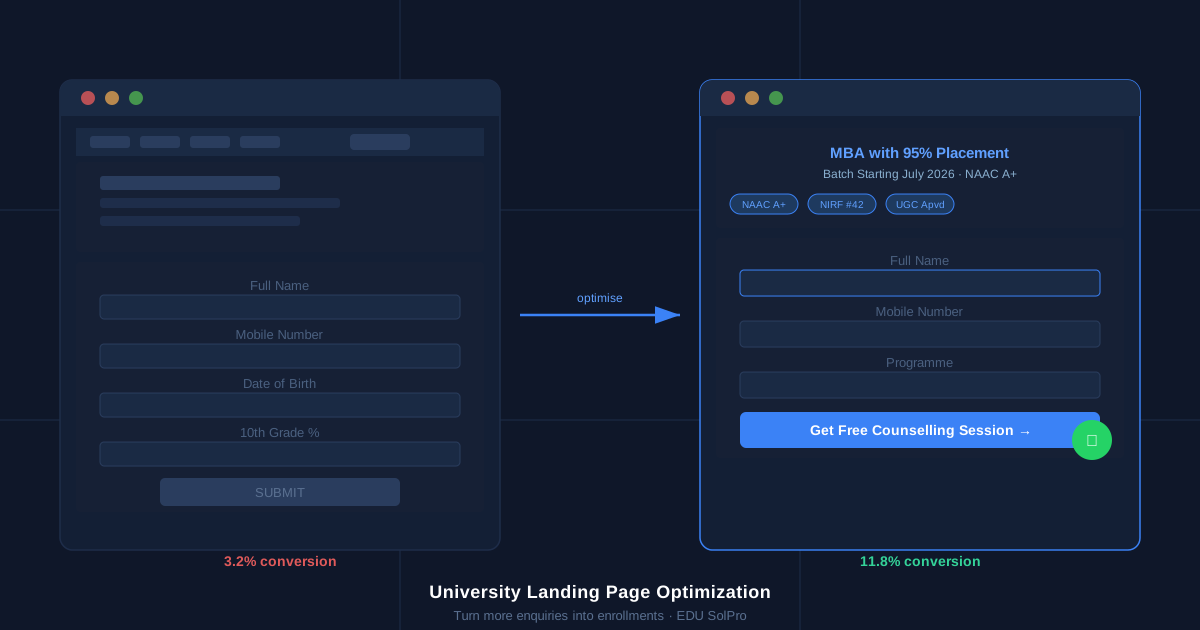
You can rank first and still get zero applications if your site doesn’t tell visitors what to do next. High traffic, zero conversions—that’s the worst outcome.
Rankings without conversions mean wasted traffic.
Common mistakes: buried inquiry forms, generic buttons with no clear next step, missing phone numbers, no chat. Also, don’t assume all visitors want the same thing—parents, new students, and transfer students need different options.
c. Solution: Make Conversion Easy
Put clear CTAs everywhere. Easy forms, visible phone numbers, mobile click-to-call, live chat. Offer multiple entry points. Test what works. Measure it.
6. Poor Internal Linking & Site Structure
Good site structure helps both people and Google. Bad structure confuses both. That’s especially painful when you have hundreds of program pages.
Orphaned pages—pages nobody links to—are invisible. We see universities with 30-40% of their pages orphaned. That’s wasted content, wasted opportunity.
Bad navigation tanks bounce rates. Students can’t find anything, so they leave. Visitors never hit inquiry forms.
c. Solution: Structure Logically
Organize clearly: Undergraduate > Business > Finance. Link programs to faculty. Link faculty to research. Use breadcrumbs. Help people find things.
7. Not Tracking or Analyzing SEO Performance
No tracking means flying blind. You won’t know which programs generate interest, which keywords work, or where your budget is going. You’ll waste money.
Without Analytics and Search Console, you have no data on visitor behavior, keyword performance, or conversions. You’re guessing.
You can’t see which programs are generating applications or which traffic sources matter most. That’s a gap.
c. Solution: Set Up Tracking
Use Analytics 4, Search Console, conversion tracking. Build dashboards showing inquiries by source, program interest by channel, ROI. Review monthly. Adjust.
8. Ignoring Local SEO
Most students search locally first. “Colleges near me” is a real search. Schools that ignore it miss out on warm leads. That’s backwards.
Local searches show high intent. Students are ready. They’re comparing schools in their area, not daydreaming about Harvard. Show up in those results.
Common mistakes: unclaimed Google Business Profile, inconsistent address/phone across directories, missing location pages for multi-campus schools, no local keyword targeting.
c. Solution: Own Your Local Presence
Claim your Google Business Profile. Complete it fully. Create location pages for each campus. Target location keywords. Get reviews. Show up in local searches.
9. Outdated Blog or News Section
Google likes fresh content. So do students. An outdated blog signals that nobody’s home. A current one signals that you’re engaged.
A blog from 2020 tells students you’re not engaged. They compare you to schools with current content and leave.
Fresh content gets Google attention and user attention. Outdated content gets neither.
c. Solution: Publish Regularly
Write about topics students search for: choosing a major, scholarship tips, career outcomes. Post monthly. Make it useful. Show what makes your school different.
Three AEO Mistakes Universities Make That Cost Them AI Search Visibility
Answer Engine Optimization (AEO) is what happens when your university’s content gets pulled directly into Google AI Overviews, ChatGPT, and Perplexity. Right now, universities that structure their content for AI search engines get cited. Universities that don’t become invisible.
Google AI Overviews extract answers from structured data. ChatGPT pulls from indexed pages. Perplexity follows the same pattern. They all prefer concise, factual, well-marked content. If your program pages read like marketing brochures, these engines skip you and find universities that answer student questions directly.
Three mistakes cost universities AI search visibility:
Mistake 1: Marketing Language Instead of Answers
Programme descriptions buried in marketing speak don’t work anymore. “Our innovative curriculum blends industry expertise with academic rigor” tells AI nothing. It tells students nothing either.
Restructure key pages to answer the questions students actually ask. “What does this programme teach?” gets a clear curriculum breakdown. “What is the placement record?” gets honest numbers. “What are the eligibility criteria?” gets specific requirements. Answer engines pull from answers. Marketing copy gets ignored.
Mistake 2: No FAQ Schema Markup
FAQ schema tells Google to treat your page as a source of answers. Without it, your content competes as regular web pages. With it, your answers show up in AI results and get cited.
Add FAQPage JSON-LD markup to your top 10 programme pages. Cover these questions: What will I learn? What are career outcomes? Is there placement support? What’s the application process? Make each question specific and each answer factual.
Mistake 3: No University Summary Block
When ChatGPT or Perplexity needs to summarize your university, they pull from whatever text they find. If you don’t have a concise, factual summary, they create one from scattered content. That’s inaccurate.
Create a 60-80 word factual overview block. Put it on your homepage and About page. Include: founding year, number of students, main programmes, key rankings or accreditations, location. Make it dense with facts. AI engines extract this for citations.
Read our full guide on Answer Engine Optimisation for Universities
Watch out
If your university’s programme pages read like brochures rather than answers to student questions, AI search engines will skip your content entirely. Brochure language does not get cited. Factual, structured answers do.
The 10-Minute SEO Audit Universities Can Do Right Now
You don’t need expensive tools to find SEO gaps. Run this quick self-audit to spot the biggest problems in under 10 minutes.
Search your institution’s name. Does a Knowledge Panel appear on the right side? If not, Google doesn’t know enough about you. Fill this gap with local SEO, schema markup, and Wikipedia presence if available.
Check your top 5 programme pages on mobile. Open each in a browser on a phone (or use Chrome DevTools mobile view). Do they load in under 3 seconds? Slow pages tank your ranking and kill applications. Time them.
Verify your Google Business Profile. Search for your university’s name and click the “Business Profile” card. Is it claimed and verified by your team? Are hours, address, and phone current? Missing or outdated information tells both students and Google that you’re not paying attention.
Check your homepage meta description. Open page source or use a Chrome extension. Is your meta description under 160 characters? Does it contain your primary keyword, like “Delhi-based business university” or “engineering college Bangalore”? If not, you’re wasting prime real estate.
Search “[your university name] reviews”. What comes up first? Are those reviews on Google, on third-party sites, or your own pages? If third-party reviews dominate with negative feedback, that’s a problem. If nothing comes up, you need a review strategy.
Quick win
Run Google’s PageSpeed Insights on your homepage right now. If your mobile score is below 70, that is the single highest-impact technical fix you can make this week. Slow pages lose ranking and lose students.
Conclusion
These mistakes cost you student traffic while competitors capture leads.
SEO isn’t about chasing the latest algorithm update. It’s about the basics: right keywords, mobile-friendly, good content, fast loading, clear next steps, tracking results.
Schools that treat SEO as a real enrollment tool win. Schools that ignore it lose ground daily.
Pick one mistake and fix it. Then the next. That’s how you move the needle.
If you want a full view of where your digital strategy is leaking students, run the 6-point university marketing audit before you start fixing individual items. And if AEO mistakes are also costing you — they often run alongside SEO gaps — read about getting found when students ask AI.
Related Resources
- University SEO Services
- Website Design and CRO for Universities
- Content Marketing for Universities
- The Complete Guide to Digital Marketing for Universities
Need expert help with your university’s digital marketing? Contact EDU SolPro for a free strategy consultation.