A student visits your MBA programme page. They spend four minutes reading through the curriculum, check the fees section, and then leave without submitting an inquiry. You never hear from them again.
This happens hundreds of times a day on most university websites, and almost no admissions marketing team has a system to recover those visits. They put all their energy and budget into getting students to the site — then let the majority walk out the back door.
Retargeting is the system that follows up on those visits automatically. Done correctly, it is one of the highest-ROI activities in your entire digital marketing stack, because you are spending money only on people who have already shown interest — not cold audiences who have never heard of you.
Why students drop off — and why calls alone don’t fix it
The admissions team’s instinct when leads go cold is to call harder and call more often. This rarely works. A student who visited your site and left without inquiring was not yet ready to talk to anyone. They were in research mode. An unsolicited call at that stage pushes them away faster.
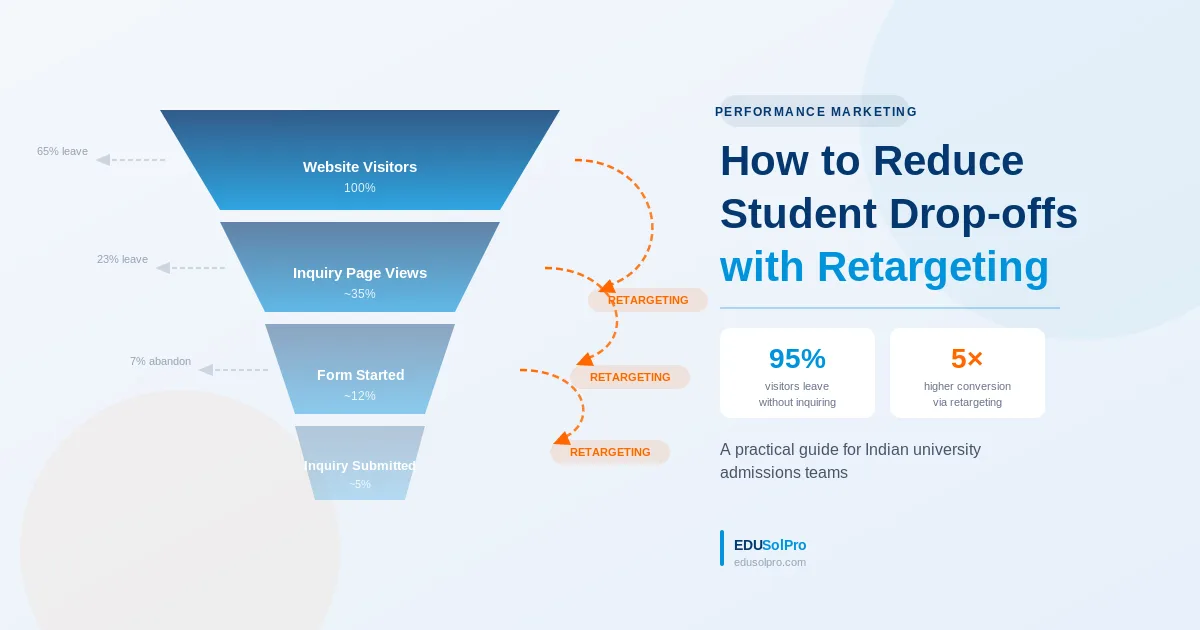
Students drop off at three distinct points in the funnel, and each requires a different retargeting response.
Visited programme or fees page. High intent signal. Never submitted a form or called. The largest and most recoverable segment.
Opened the inquiry form but did not submit. Extremely high intent — something interrupted them. Easy to recover with a single reminder.
Submitted a form but stopped responding to calls and WhatsApp. Still evaluating. Needs content, not a sales pitch.
Each stage requires different messaging and different ad formats. Running one generic retargeting ad to all three audiences is a common mistake — it wastes budget on warm leads by treating them like cold ones.
The three-audience retargeting setup
Audience 1 — Programme page visitors (90-day window)
Anyone who visited a specific programme page in the last 90 days goes into a retargeting audience for that programme. If someone visited the BBA page, they see BBA retargeting ads — not generic university ads. If they visited Engineering, they see Engineering ads.
The message at this stage is not “Apply Now.” It should address the objection that stopped them from inquiring in the first place: placement statistics, fee structure clarity, a student testimonial, or a campus experience visual. Something that moves them from curious to convinced.
Audience 2 — Form abandoners (14-day window)
This audience is gold. They got to the form and stopped. Run an extremely focused retargeting ad — one message, one CTA: “You were looking at [Programme Name]. We saved your spot. Finish your inquiry here.” Keep the copy short. The creative does not need to be complex. The student already knows what they want.
Audience 3 — Inquiry submitted, not progressed (30-day window)
These students are in comparison mode. They submitted an inquiry to your university and probably two or three others. Calling them repeatedly signals desperation. Retargeting them with content — a programme comparison, a campus video, a “what our students say” carousel — keeps your university visible and credible while they make their decision.
For a deeper look at how to structure your Google and Meta Ads accounts to support retargeting alongside acquisition campaigns, the setup principles carry over directly.
Platform split: Google Display versus Meta
Both platforms work. They do different things.
| Google Display | Meta (Facebook/Instagram) | |
|---|---|---|
| Best for | Browsed, didn’t inquire (stage 1) | All three stages, especially cold inquiry recovery |
| Format | Banner ads, responsive display | Stories, Reels, carousel posts |
| Audience match | URL-based (programme pages) | Custom audience upload + pixel |
| Typical CPM | ₹25–50 | ₹60–120 |
| Frequency cap | Set at 3–5/week to avoid fatigue | Cap at 4–6/week |
For most universities, split retargeting budget 60% Meta / 40% Google Display. Meta’s targeting for the 17–24 age group in India is more precise, and the creative formats — especially Reels — perform better for campus experience content. Google Display is more efficient for pure reminder-style ads to programme-page visitors.
Budget allocation for retargeting
Retargeting should receive 15–25% of your total performance marketing budget. It is not a secondary consideration — it is the mechanism that makes your acquisition spend worthwhile. If you are spending ₹3 lakhs a month on Google and Meta acquisition campaigns but zero on retargeting, you are generating inquiries and then letting most of them go cold through no follow-up system at all.
The university marketing budget guide covers the full breakdown of how to allocate across channels for an annual admissions cycle — retargeting sits clearly in the mid-funnel bucket alongside email and WhatsApp automation.
Three things retargeting cannot fix
Retargeting amplifies what is already working. It does not fix broken fundamentals.
If your programme pages have weak content, poor fee transparency, or no placement data — retargeting will not convert. You will just show people a reminder to visit a page that didn’t convince them the first time.
If your inquiry form is long, slow, or mobile-unfriendly — retargeting will drive abandoners back to the same friction. The form is the problem, not the audience.
If your calling team has a 48-hour response time — retargeting for form abandoners loses its effectiveness entirely. The ad brings them back. If no one answers when they do call, the effort is wasted.
Fix these before scaling retargeting spend. Once those fundamentals are in place, retargeting becomes one of the most efficient budget allocations in your lead generation system.
Where to start
If you are new to retargeting, begin with one audience: programme page visitors in the last 30 days. Set up the Google and Meta pixels on your website. Create two to three ad creatives per programme. Run it for 45 days with a modest budget — ₹15,000–₹20,000 — and measure cost-per-inquiry against your acquisition campaigns.
The comparison will be enough to convince any admissions director that retargeting deserves a permanent share of the budget.
Related reading: